
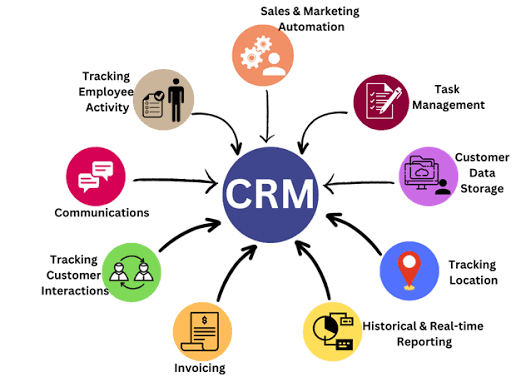
As your business grows, managing customer relationships becomes more complicated. Customer details, inquiries, sales interactions, follow-ups, appointments, orders and communications all become impossible to track when you have spreadsheets, emails, documents, or a mix of applications holding vital pieces of information.
Customer Relationship Management (CRM) software keeps customer information organized and accessible by providing a centralized location to manage all your customer interactions. CRM systems also help keep customer records structured, allow you to track all interactions, help manage your sales activities and give your team a clear picture of processes related to your customers.
A CRM is much more than a database of customer names and phone numbers. A good CRM can be an integral part of your company’s sales operations, customer management and general business process.
What Is CRM Software?
CRM software is a platform to aid in managing and interacting with current and future customers. It can be configured to store customer profiles, leads, sales opportunities, interaction history, tasks, appointments, documents, reports and any other pertinent customer-related information, depending on business needs. CRM systems can be used by businesses of all sizes and industries, ranging from a basic customer database to a customized platform connected with other business systems.
1. Keeps Customer Information Organized
CRM software’s basic function is to keep customer information centralized. Rather than keeping customer information scattered across spreadsheets, emails, documents or in separate systems, businesses will have all vital customer data within a structured CRM application. A customer profile may include their contact information, past interactions, inquiries, purchase history, appointments, notes, tasks, or other details.
2. Organizes Lead Management
As your business grows, you’ll receive leads through various channels such as websites, phone calls, email, social media, referrals and more. Managing these leads manually can be an overwhelming process.CRM software helps streamline the recording of new leads, assignment of tasks, tracking of their progression through the sales process and scheduling of follow-ups.
3. Tracks Customer Interactions
As you interact with your customers, it’s important that important context is captured after each interaction. CRM software allows you to log every interaction, whether it’s a phone call with your salesperson or an email from your customer. This information is then available for authorized personnel to view so they can gain full insight into your customers’ relationship with your business.
4. Makes Follow-Ups Easier
Following up with your customers and prospects is critical. CRM software can help your team by creating scheduled tasks, activities and reminders for follow-ups, reducing the reliance on spreadsheets or personal notes.
5. Provides a Clear Sales Pipeline
CRM software enables the visualization of sales processes through what’s known as a sales pipeline. Leads and opportunities are categorized into different stages based on your business process, typically including new leads, contact made, qualified, proposal sent, negotiation, won, or lost. This helps the sales team as well as management get a clear overview of where each prospect is in the sales cycle.
6. Improves Team Collaboration
Customer information is typically shared across multiple departments within a company. CRM software ensures that when the right information is needed, authorized personnel have access to all relevant customer data so they can make informed decisions when interacting with your clients.
7. Allows Managers to Monitor Activities
managers get their desired overview of sales activities and customer interactions through reports and dashboards found in CRM systems. Managers will be able to view team activity, understand individual pipeline progress, and review outstanding tasks, conversion data and more depending on the CRM’s configuration.
8. Aids in Better Customer Service
customer service team needs access to current and relevant customer data when interacting with clients. A CRM can provide your service team with access to previous conversations, order histories, service records and more depending on the complexity of the system. This can increase the speed and relevance of customer support responses, and the centralized nature of the database will ensure consistent customer service regardless of which employee is assisting the customer.
9. Automates Repetitive Tasks
CRM software can also automate a variety of repetitive tasks depending on your business needs. Some examples include follow-up reminders, assignment of tasks, notifications, lead status updates, email triggers, approval workflows, data updates, scheduled reports and more. These time-saving features free up employees to focus on more productive tasks.
10. Provides Reports and Dashboards
CRM software systems can generate valuable reports and dashboards that help organizations analyze sales and customer data. These reports may focus on leads, opportunities, customer acquisition, follow-up activity, sales pipeline, or even team performance. The specific reports available depend on your business requirements and the amount of data that has been entered into your CRM application.